SAILOR MOON TREAT BAG CRAFT
Fill with treats to give to the guests after the party or use it to hold a gift for the birthday boy.
You will need: something to color with (optional), scissors, glue, and paper (I prefer construction paper as it's a bit sturdier. I just chop it down a bit to fit in my printer).
OPTIONAL: string, wool or ribbon.
- Print out the template of choice. There is a choice between a LARGE bag and a SMALL bag. Before you mass produce, you might want to make one of each to see which you prefer.
- Cut out the template along the outside lines. Cut along the dotted lines (this will be the bag's bottom. Younger kids may need help with this (it can be pre-done prior to colouring).
LARGE BAG:
|
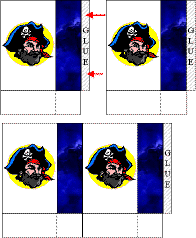
This is the pirate image instead of
the sailor moon one, but the method is identical so I didn't
bother to make another directions image.
|
SMALL BAG
- Imagine a line extending up from the dotted lines you cut. Fold along these imaginary lines, fold the GLUE tab and fold up the tabs for the bag's bottom
- Put glue on the glue tab (or tape) and glue it to the inside of the bag.
- Put glue on the tabs for the bags bottom and carefully press together.
- Attach a piece of string, wool or ribbon to make a handle (or cut a piece of construction paper for the handle).
- Close the template window after printing to
return to this screen.
- Set page margins to zero if you have trouble fitting the template on one page (FILE, PAGE SETUP or FILE, PRINTER SETUP in most browsers).
LARGE BAG TEMPLATE (print 2) (color) or (B&W)
SMALL BAG TEMPLATE (color) or (B&W)
Different computers work a bit differently in terms of how they print. If the first templates don't work for you, try these instead: