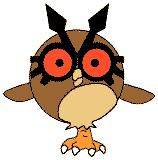
HOOT HOOT POKEMON CRAFTHoot Hoot is pokemon #163. It always stands on one foot and changes
feet so fast, the The templates were originally made for a CD (which is 4.75 inches in
diameter), but anything that's round and about the same size works... Make
sure you ask an adult before you start gluing things to CD's!! |
 |
- Print out the template of choice.
- Color (where appropriate) and cut out the template pieces.
- Glue the large (brown) circle on the front to cover the CD.
- Glue the leg onto the bottom of the CD.
- Glue the wings, eyes and beak onto the front of the CD (see picture above).
- Close the template window after printing to return to this screen.
- Set page margins to zero if you have trouble fitting the template on one page (FILE, PAGE SETUP or FILE, PRINTER SETUP in most browsers).
- You can hang your HootHoot on the wall or cover with clear contact paper and use as a coaster.
Template for a color printer
Template for black & white printer